Importing a Registry change to the ART database is available from the Registry menu or by using the button Import  from the toolbar. from the toolbar.
|
|
|
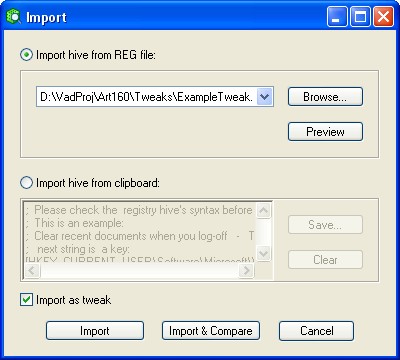
| You can import a REG file as a whole using "Import hive from REG file" or insert only a selected part of the file from the clipboard in the editing window using "Import hive from clipboard".
|
|
|
| When selecting a REG file for import you can see its contents by using the Preview button. The REG file being imported may be either in the new or in the old format.
|
|
|
|
|
|
| By switching to the "Import hive from clipboard" mode you can insert text from the clipboard and edit it if necessary.
|
|
|
| Pay particular attention to the syntax when editing a REG file. For an import to succeed it must fully correspond to a standard REG file (the only exception is that the title Windows Registry Editor Version 5.00 or REGEDIT4 is unnecessary). The text that has been changed may be saved in a file. The file will be saved in Unicode or ANSI format in accordance with the options in Edit | Settings | Export.
|
|
|
| By clicking the Import button all the contents (depending on which radio button is set: "Import hive from REG file" | "Import hive from clipboard") will be imported to the ART database. You will see one more snapshot, which will be placed in a branch of the REG files tree. Now you can compare the imported key to its respective keys in the earlier snapshots, as well as to the current Registry.
|
|
|
| If comment lines were in imported from the file/text they automatically will be added to the new snapshot's comments, which you can edit later. If there are no comment lines it is generally useful to create a snapshot comment manually.
|
|
|
| If Import as tweak is check marked, a registry hive (a key and all its subkeys) will be placed to a branch of the Tweaks' tree by clicking on the Import button. The button Import & Compare makes available the main feature of the Tweak object, which is automatic scanning of the appropriate part of the registry after an import of a tweak is accomplished as well as the comparison of the tweak and the Registry. Using this you can immediately evaluate the state of your registry according to the same keys and values, which are present in the Tweak
|
| See Tweaks for more information about this very useful feature.
|